

What Is the DNS System? A Simple Guide to How the Internet Finds Websites
Introduction
When you type a website address like www.google.com into your browser, how does your device know where to go? That’s the job of the DNS system—one of the most essential yet invisible parts of the internet.
In this post, we’ll explain what the DNS system is, how it works, and how it connects to web security protocols like http, https, ssl and tls.
What Is the DNS System?
DNS stands for Domain Name System. It’s like the phonebook of the internet. While humans access websites using domain names (like example.com), computers use IP addresses (like 192.0.2.1). DNS translates these domain names into IP addresses so browsers can load internet resources.
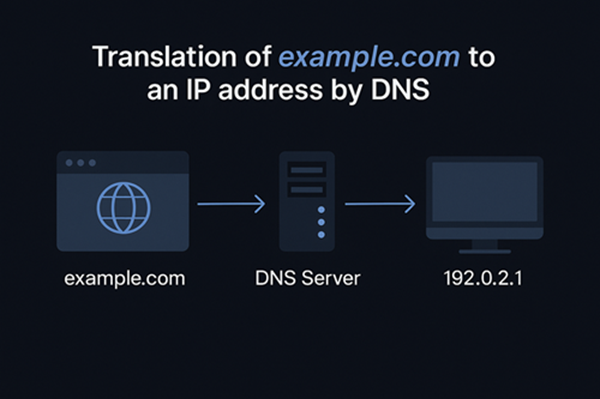
How the DNS System Works (Step-by-Step)
Here’s what happens behind the scenes when you visit a website:
-
You enter a URL (like
https://example.com) into your browser. -
Your browser checks local cache to see if it already knows the IP address.
-
If not, it asks a DNS resolver (usually your ISP) to find it.
-
The resolver queries root name servers, TLD servers, and finally the authoritative name server.
-
The server responds with the correct IP address.
-
Your browser connects to that IP—and the site loads.
How DNS Relates to HTTP, HTTPS, SSL and TLS
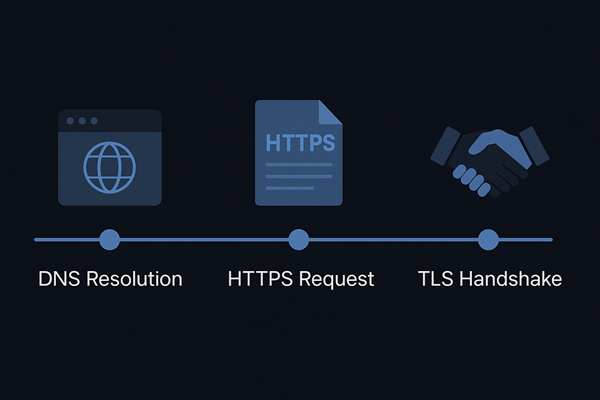
Once the DNS system finds the IP address, your browser initiates a connection using HTTP or HTTPS. If it’s an HTTPS connection, it will use SSL/TLS to encrypt the session.
Here’s how it connects:
-
DNS = “Where is the website?”
-
HTTP/HTTPS = “Talk to the website”
-
SSL/TLS = “Talk securely”
This is why DNS and http, https, ssl and tls work together to make browsing both functional and secure.
Common DNS Records You Should Know
A Record: Maps domain to IPv4 address.
AAAA Record: Maps domain to IPv6 address.
CNAME: Alias for another domain.
MX Record: Mail exchange (email routing).
NS Record: Name server for the domain.
TXT Record: Text data (e.g., for SPF or domain verification).
Understanding these records is useful when configuring domain settings or troubleshooting issues.
DNS and Website Speed
DNS lookup times can impact website performance. Slow DNS resolution can delay how fast a page loads—even before the http, https, ssl and tls protocols kick in. To speed things up:
Use reliable DNS providers (like Cloudflare, Google DNS)
Enable DNS caching
Reduce the number of external domain requests
DNS Security and Its Role in HTTPS
Though DNS itself doesn’t encrypt data, it plays a critical role in the secure web ecosystem. Once DNS finds the server, SSL/TLS steps in to encrypt the connection.
There are also DNS-specific security measures like:
DNSSEC (DNS Security Extensions): Protects against forged DNS data.
DoH (DNS over HTTPS): Encrypts DNS requests using HTTPS.
DoT (DNS over TLS): Encrypts DNS requests using TLS.
These technologies help DNS support the broader goals of https, ssl and tls.
Here is a comparison table outlining the key differences between Standard DNS, DNSSEC, DoH (DNS over HTTPS), and DoT (DNS over TLS):
| Feature | Standard DNS | DNSSEC | DoH (DNS over HTTPS) | DoT (DNS over TLS) |
|---|---|---|---|---|
| Purpose | Resolves domain names to IP addresses | Adds authentication to DNS responses | Encrypts DNS traffic using HTTPS | Encrypts DNS traffic using TLS |
| Encryption | ❌ No | ❌ No | ✅ Yes (via HTTPS) | ✅ Yes (via TLS) |
| Authentication of Data | ❌ No | ✅ Yes (using digital signatures) | ❌ No (unless used with DNSSEC) | ❌ No (unless used with DNSSEC) |
| Integrity Protection | ❌ No | ✅ Yes | ✅ Yes (in transit) | ✅ Yes (in transit) |
| Confidentiality | ❌ No | ❌ No | ✅ Yes | ✅ Yes |
| Protection Against Spoofing | ❌ No | ✅ Yes | 🚫 Not by itself (needs DNSSEC for this) | 🚫 Not by itself (needs DNSSEC for this) |
| Transport Protocol | UDP/TCP (port 53) | UDP/TCP (port 53) | HTTPS (port 443) | TLS (port 853) |
| Impact on Latency | ✅ Low | 🔺 Slight increase | 🔺 Slight to moderate increase | 🔺 Slight to moderate increase |
| Deployment Complexity | ✅ Easy | 🔺 Moderate | 🔺 Moderate | 🔺 Moderate |
| Client Privacy | ❌ Poor | ❌ Poor | ✅ Strong (via encryption + HTTPS) | ✅ Strong (via TLS) |
| Support in Browsers | ✅ Universal | ✅ Some (for validation) | ✅ Built-in in major browsers | ❌ Not used by browsers (used by OS/apps) |
| Common Use Cases | General DNS lookups | Authenticating domain ownership | Privacy-focused browsing, censorship evasion | Secure DNS in system-level or apps |
Summary:
Standard DNS is fast but lacks encryption and security features.
DNSSEC adds authenticity and integrity but not privacy.
DoH and DoT protect DNS traffic from eavesdropping and tampering but require DNSSEC for authenticity.
DoH is more suited to browsers and user privacy; DoT is often used at the system or network level.
Conclusion
The DNS system is the invisible backbone of every website you visit. Without it, typing www.example.com wouldn’t work—you’d have to remember IP addresses.
But DNS doesn’t work alone. It’s the first step in a chain that includes http, https, ssl and tls, all working together to deliver a fast, reliable, and secure web experience.